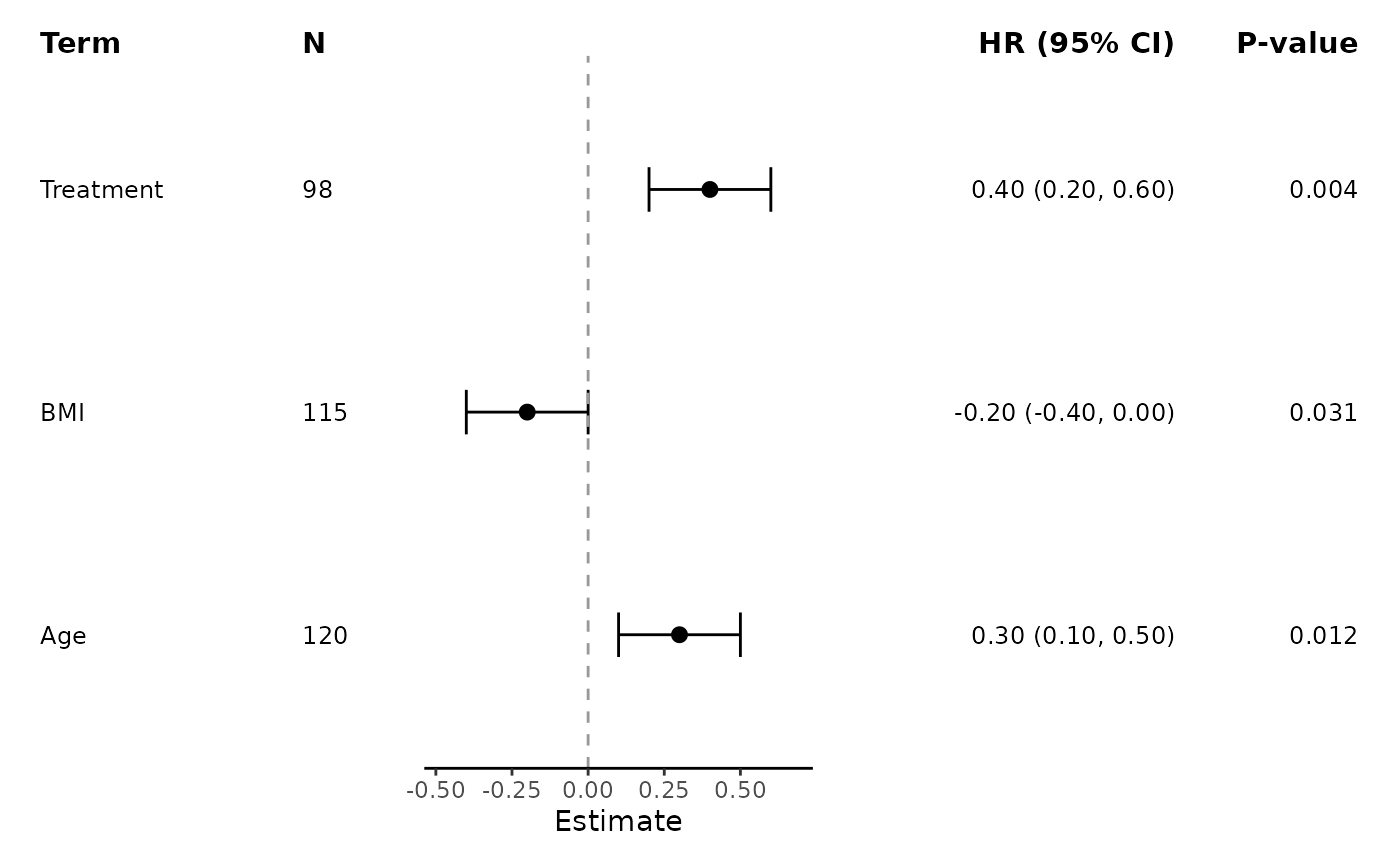
Compose split table blocks around a forest plot so that summary data appear on both sides of the plotting panel.
Usage
add_split_table(
  plot = NULL,
  left_columns = NULL,
  right_columns = NULL,
  term_header = "Term",
  n_header = "N",
  events_header = "Events",
  estimate_label = NULL,
  p_header = "P-value",
  column_labels = NULL,
  digits = NULL,
  estimate_digits = NULL,
  interval_digits = NULL,
  p_digits = NULL,
  estimate_fmt = NULL,
  ci_fmt = NULL,
  text_size = NULL,
  header_text_size = NULL,
  header_fontface = "bold",
  header_family = NULL,
  striped_rows = NULL,
  stripe_fill = NULL,
  stripe_colour = NULL,
  stripe_alpha = NULL,
  left_width = NULL,
  plot_width = NULL,
  right_width = NULL
)
Arguments
- plot
A plot created by
ggforestplot(). Leave asNULLto use+ add_split_table(...)syntax.- left_columns
Optional explicit columns to place on the left side of the forest plot. Accepts built-in names such as
"term","group","n","events","estimate","ci", and"p", arbitrary original dataframe columns, or numeric positions in the supplied data."conf.low"and"conf.high"are accepted as aliases for"ci". The default grouped layout includes"group"on the left. Its header defaults to the source column supplied throughgroup =for data frames and to"Model"forbind_forest_models()output.- right_columns
Optional explicit columns to place on the right side of the forest plot. Accepts built-in names such as
"group","estimate","ci", and"p", arbitrary original dataframe columns, or numeric positions in the supplied data."conf.low"and"conf.high"are accepted as aliases for"ci".- term_header
Deprecated. Use the corresponding entry in
column_labels, such ascolumn_labels = c(term = "Variable").- n_header
Deprecated. Use
column_labels = c(n = "N")instead.- events_header
Deprecated. Use
column_labels = c(events = "Events")instead.- estimate_label
Header label for the estimate column. Defaults to the model-derived label when available.
- p_header
Deprecated. Use
column_labels = c(p = "P-value")instead.- column_labels
Optional named vector used to relabel table column headers. Names should match values supplied to
left_columnsorright_columnsafter column resolution, such as"term","group","estimate","ci","p", or an arbitrary original dataframe column. For grouped data frames, either"group"or the source column supplied throughgroup =can relabel the group column. Use this argument instead of the deprecated dedicated header arguments.- digits
Deprecated. Number of digits used when formatting estimates and p-values. Defaults to
2. Useestimate_digits,interval_digits, andp_digitsfor separate control.- estimate_digits
Number of digits used for point estimates.
- interval_digits
Number of digits used for confidence interval bounds.
- p_digits
Number of digits used for p-values.
- estimate_fmt
Format string for the estimate column. Use
{estimate},{conf.low}, and{conf.high}as placeholders. The shorthand{conf.low, conf.high}is also supported. Defaults to"{estimate} ({conf.low}, {conf.high})", or"{estimate}"when table columns include"ci".- ci_fmt
Format string for the confidence interval column when table columns include
"ci". Use{conf.low}and{conf.high}as placeholders. The shorthand{conf.low, conf.high}is also supported. Defaults to"({conf.low}, {conf.high})".- text_size
Text size for table contents. Defaults to
3.2.- header_text_size
Header text size for table column labels. Defaults to
11.- header_fontface
Font face used for table column labels. Defaults to
"bold".- header_family
Optional font family used for table column labels.
- striped_rows
Whether to draw alternating row stripes behind the split table layout. Defaults to the stripe setting used in
ggforestplot().- stripe_fill
Fill colour used for striped rows. Defaults to the stripe fill used in
ggforestplot().- stripe_colour
Outline colour for striped rows. Defaults to the stripe outline used in
ggforestplot().- stripe_alpha
Transparency for striped rows. Defaults to the stripe alpha used in
ggforestplot().- left_width
Optional width allocated to the left table block. By default this is derived from the number of displayed left-side columns relative to
plot_width.- plot_width
Optional width allocated to the forest plot panel. Defaults to
2.5.- right_width
Optional width allocated to the right table block. By default this is derived from the number of displayed right-side columns relative to
plot_width.
Value
A patchwork-composed plot containing a left table, the forest plot,
and a right table, or a ggplot add-on object when plot = NULL.
Examples
coefs <- data.frame(
term = c("Age", "BMI", "Treatment"),
estimate = c(0.3, -0.2, 0.4),
conf.low = c(0.1, -0.4, 0.2),
conf.high = c(0.5, 0.0, 0.6),
sample_size = c(120, 115, 98),
p_value = c(0.012, 0.031, 0.004)
)
p <- ggforestplot(coefs, n = "sample_size", p.value = "p_value")
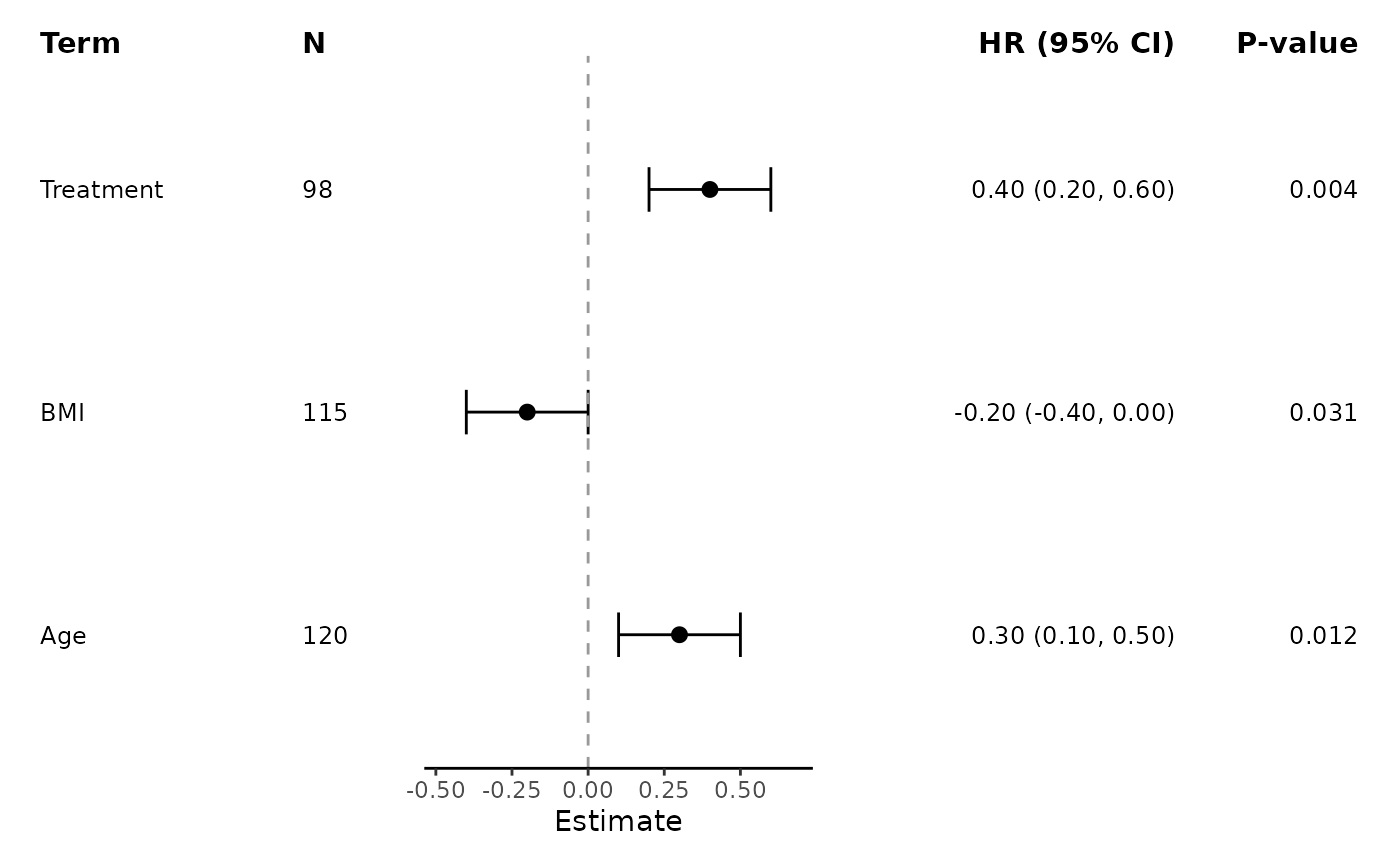
add_split_table(
p,
left_columns = c("term", "n"),
right_columns = c("estimate", "p"),
estimate_label = "HR"
)
 ggforestplot(coefs, n = "sample_size", p.value = "p_value") +
add_split_table(
left_columns = c(1, 5),
right_columns = c(2, 6),
estimate_label = "HR"
)
ggforestplot(coefs, n = "sample_size", p.value = "p_value") +
add_split_table(
left_columns = c(1, 5),
right_columns = c(2, 6),
estimate_label = "HR"
)